
jungleNZ
-
Posts
424 -
Joined
-
Last visited
-
Days Won
43
Content Type
Profiles
Forums
Events
Downloads
Everything posted by jungleNZ
-
Here is one I have just whipped up. You have to set mods, tracks, vehicles from files. WIP. rf2 - Windows.xml
-
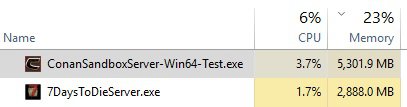
Some games like Conan, 7DTD, Ark etc... run normal with high ram usage with no players in game. It is normal. As for the slots and query part - not sure.

-
Yes you do. If you already have game the server files are in with the client.
-
View File Assetto Corsa Competizione About This File This is windows config for AC Competizione. Installation Download the config Go to TCAdmin > System > Settings > Game & Voice Hosting > Game & Other Voice Servers > Import Save the config as a new config or chose "Overwrite existing config" if you which to overwrite your current config. Leave all other settings features... Added Custom & Default Variables. Wiki and Server Manual links. Logs and Console. Known Issues... All configuration editors work however there are some variable/features that cannot be turned off in public multiplayer. They will work on private servers. The ranking system for driver skills etc... are set manually in the config text editors. (read manual for best settings). There are no Competitive multiplayer options - only Kunos have these servers. There is no known Query feature. To Do... nothing (i hope) Submitter jungleNZ Submitted 3/31/2020 Category Game Configs
-
Not that I play the game but great work.
-
It can be done but not config scripts are located here. Some past posts had similar request(s), replies mentioned you also need to create database setups for each install. It is just a matter of creating custom script to install (or as a mod) and then also script database stuff.
-
Great job again LFA.
-
I have this set for installing the mod to correct folder however a line has to be amended to the server_config.cfg which is in the game root directory. The line to append is mods = I have tried altering other codes (ark alter .ini and other scripts as well as trying to learn/look at python tutorials) for other mods to make it write the FileId to end of mods = however to no avail. Any clear people out there that can shed light. (Help me learn as we go). Cheers jungle (James)
-
Thanks LFA. Will look around.
-
Hi, Trying to learn ironpython, one by looking over existing scripts, two through net searches. What is/are good sites to look at? Also working on workshop mods, seeing some made and ready to use, I am trying to make the wreckfest one work. I have it where mod goes to folder, that part all good, but the .cfg file needs to have the fileid written into it. What is best way, do I use configparser or is that all wrong. I have tried to look at the ark one which writes to ini but does not seem to be for cfg. Guidance and/or help would be appreciated. jungle (James)
-
Unlikely to work as the server file is only 1 file, an executable that then opens up new GUI interfaces to create the server you want. Steamcmd for file(s) is +login "anonymous" +force_install_dir "C:\TCAFiles\Games\raceroom" +app_update 354060 validate +quit.
-
Got my one working for windows (originally said it was started but process always died, where as running from windows worked). Basic config, I have not gone through doing variables for everything, find it easier to adjust in config text editor. Only issue is once started it does not show the STOP/RESTART buttons, only STOPPED or START ERROR. Game however is running - console logs shows. I have created a stop button - select from MORE. This will stop server when wanted. (This has been a weeks mission to get it right as past configs seemed to have stopped working - feel free to adjust/add to). empyrion - Windows.xml
-
View File Kreedz Climbing Fairly basic setup. Installation Download the config Go to TCAdmin > System > Settings > Game & Voice Hosting > Game & Other Voice Servers > Import Save the config as a new config or chose "Overwrite existing config" if you which to overwrite your current config. Leave all other settings Submitter jungleNZ Submitted 3/7/2020 Category Game Configs
-
View File The Mean Greens - Plastic Warfare Config was asked for a while ago but none ever supplied. Basic config. Anonymous steam downloading. Installation Download the config Go to TCAdmin > System > Settings > Game & Voice Hosting > Game & Other Voice Servers > Import Save the config as a new config or chose "Overwrite existing config" if you which to overwrite your current config. Leave all other settings Submitter jungleNZ Submitted 3/6/2020 Category Game Configs *New*
-
View File Day of Dragons Basic Config > Nothing Special Installation Download the config Go to TCAdmin > System > Settings > Game & Voice Hosting > Game & Other Voice Servers > Import Save the config as a new config or chose "Overwrite existing config" if you which to overwrite your current config. Leave all other settings Submitter jungleNZ Submitted 3/5/2020 Category Game Configs
-
View File Gearstorm Basic config > Nothing Special. [The game does use CPU and memory]. Installation Download the config Go to TCAdmin > System > Settings > Game & Voice Hosting > Game & Other Voice Servers > Import Save the config as a new config or chose "Overwrite existing config" if you which to overwrite your current config. Leave all other settings Submitter jungleNZ Submitted 3/5/2020 Category Game Configs *New*
-
Some issues: 1: I want to NOT display my birthday date. (but a bit late now). Seems the only one without a birthday is LFA 2: Should be able to edit and/or delete post and/or replies to posts (your own ones obviously). Currently edit shows for about 2 seconds and then shows no post error.
-
Turns out I updated the redistutables and it runs through tcadmin2.
-
@JetFoxwhat server do you run with what OS? I have one system running server 2016 and it does not work, tried another that has window 10 - it works.
-
I put one together to see why you were not getting it to work. Mine does not work connecting via tcadmin2. It works if you run it from the files launcher command. Runs fine. But again starting through tc it shows only starting empyriomlauncher not empyriomserver.exe Will keep looking into it. Others may have some idea.
-
Hi all that set it up. Looking good. Bright and bold (will take a small time to adjust). Nice work, giving TCAdmin a fresh look.
-
Will do.
-
v 2.0.141.0 (latest)
-
Is there a memory leak in tcadmin. Only noticed today after doing a system sweep/cleanup. Any ideas?
-
You are a champion. Keep up the good work.