
jungleNZ
-
Posts
423 -
Joined
-
Last visited
-
Days Won
43
Content Type
Profiles
Forums
Events
Downloads
Everything posted by jungleNZ
-
Nothing wrong with this panel and setup. Actually find it easier to use than any of the other panels out there.
-
Will test now. Config works fine Have you got files in the tcafiles/games folder? Run a steam update.
-
Nope dont have linux. Sorry
-
Turns out you need to make sure queryport in 2 more than the port number and rcon +2 as well. Not a cpu thing.
-
Config runs fine. When you start server up goto client and see if appears on list (custom servers) - most of the lines in logs are normal although at end should say server started
-
my config that works (unless incompatible cpu) squad - Windows.xml
-
the original one works with change i made above however v3 does not work on some cpu's (it hang when players try to connect)
-
They have changed whole setup for servers. I have new config (very basic this stage) that will get things started. You need to ensure your tcafiles\games folder version of stationeers has been updated. I have found it runs fine from batch file in root directory but will not run through tcadmin. Think it is something to do with the console having coloured text in it. Changing to "run as local" does not work, changing to run directly from start.bat does not work. It shows on serverlist (running through tcadmin) but connection fails. (I am running on windows server 2016) Change WEB CONSOLE to "consolewrapper" and "none". Uncheck the text output as required, save. (I will update config here a bit later) All updated It should now run through tcadmin. Files attached, see if you have any luck. UPDATED CONFIG - Minor tweaks stationeers - Windows.xml
-
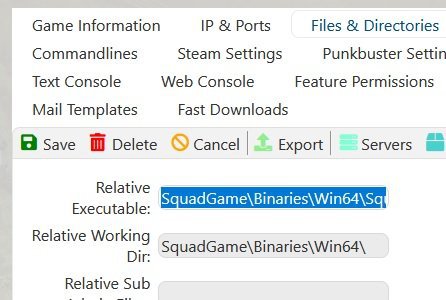
The executable location of server.exe needs to be adjusted. "SquadGame\Binaries\Win64\SquadGameServer.exe"

-
Not available for public yet. Only playtest and they have removed Ds file access.
-
try this from Gotteshand vintagestory - Windows.xml vintagestory(eng) - Windows.xml
-
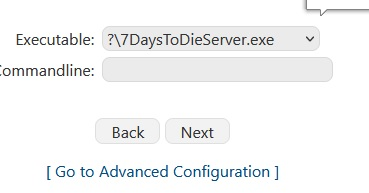
Always have a problem when creating a config. On creating new config and getting to section to select exe it only has option of ?\............. Why is ?\ appearing. I have to delete these every time config has been created. Is it some setting I have not got running that allows it.
-
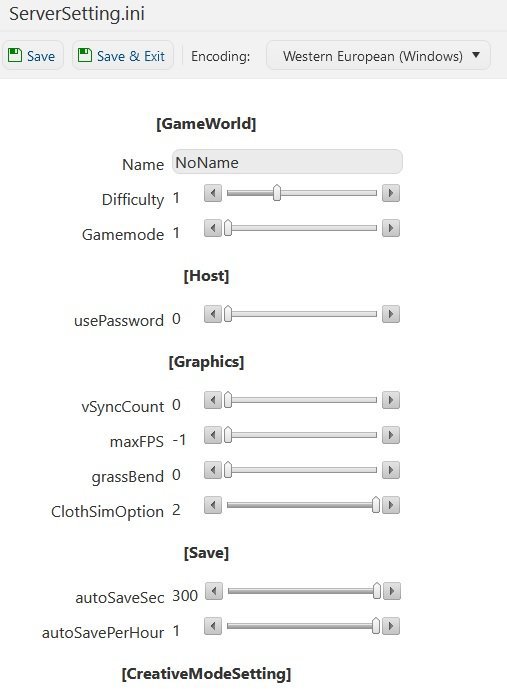
Not much - seversettings.xml will need the same line added. (whole xml on LFA one likely needs updating as some other lines have been added with game update versions.)
-
Hi Dennis, these lines need to be added to serversetting. In the first section. <property name="Region" value="Oceania" /> <!-- The region this server is in. Values: NorthAmericaEast, NorthAmericaWest, CentralAmerica, SouthAmerica, Europe, Russia, Asia, MiddleEast, Africa, Oceania --> <property name="Language" value="English" /> <!-- Primary language for players on this server. Values: Use any language name that you would users expect to search for. Should be the English name of the language, e.g. not "Deutsch" but "German" -->
-
search works: project zomboid
-
Already done.
-
It is incomplete and needs to be removed. Use the other config that is in these forums.
-
View File ECO v11.0 Installation: Download the config Go to TCAdmin > System > Settings > Game & Voice Hosting > Game & Other Voice Servers > Import Save the config as a new config or chose "Overwrite existing config" if you which to overwrite your current ECO config. Remember to select ECO in the 'Update Game' field if you do Leave all other settings Issues: None at present. Config also created/modified with input from Numpty. If anything needs changing let us know. Submitter jungleNZ Submitted 4/25/2022 Category Game Configs
-
Will look at it but not sure what it is. Have not seen the word docker anywhere when setting up. Have removed all variables. Try this config and see if same thing happening. craftopia - Windows(1).xml
-
What is the error?
-
in the configuration files go into the EmpyrionConfig.yaml file and put "" either side of $[hostname] so it looks like this: Srv_Name: "$[HostName]" save and retry starting.
-
something wrong your end. Works fine downloading it from site to pc. You have windows right?
-
Strange mine shows: (I have re uploaded the config file in case something on it was not right)
-
Hi,
Is there any way to add "" to the mods commandline. Some mods still have 2 words with space between (ie: @Dabs Framework) that causes server not to load.
I have tried t9o alter commandline -mod="![mods]" but the "" keep getting removed when new mods added.
Cheers
-
View File Craftopia Installation: Download the config Go to TCAdmin > System > Settings > Game & Voice Hosting > Game & Other Voice Servers > Import Save the config as a new config or chose "Overwrite existing config" if you which to overwrite your current CRAFTOPIA config. Remember to select CRAFTOPIA in the 'Update Game' field if you do Leave all other settings Included: Configuration Editor. Console. Issues: Player number max 7 at present. Still in devolpement. No query protocol. At present set to conole wrapper. If anything needs changing let us know. Submitter jungleNZ Submitted 4/25/2022 Category Game Configs